CCAMLR Science Toolbox

www.ccamlr.org
Conversion Factors – Power Analysis
A simple definition of power is the probability of detecting a change using a statistical test. In the context of toothfish Conversion Factors (CFs), which are generally normally distributed, power was here calculated as the probability of detecting a 3% change in CFs using a Student’s t-test, and the target power was set at the common level of 80%. The R script given below performs a Power Analysis on simulated CF data and was first provided in Annex 2 of WG-SAM-2025/01.
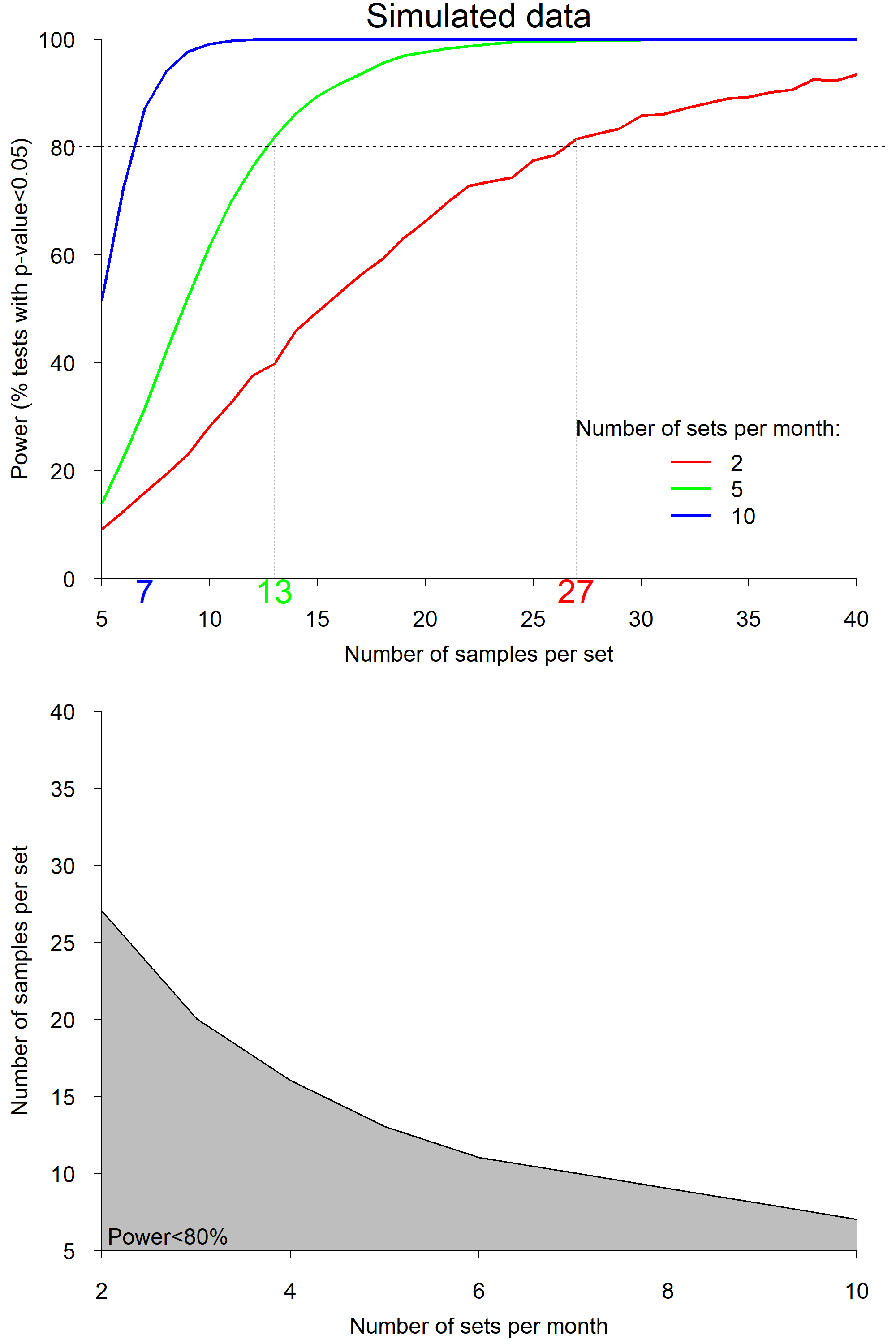
Figure 1. Results of the power analysis using simulated data. Top: Power as a function of number of samples per longline set, for 3 different numbers of sets per month (red: 2 sets; green: 5 sets; blue: 10 sets). The horizontal dashed line indicates the target power of 80% and coloured numbers on the x-axis indicate the required numbers of samples per set to reach that target power. Bottom: 80% isoline of power as a function of the number of samples per set and the number of sets per month. The grey area indicates the zone of insufficient power.
Steps
-
Create a folder, a new R project in that folder, and put the R script in that folder,
-
Open the R project and run the script. A csv file and a figure (Fig. 1) will be created in your folder.